Open source
Entra-Credential-Monitor
Every Entra ID tenant accumulates app registrations, and every app registration holds secrets and certificates that expire. Nobody notices until the integration they power stops working. This monitor notices a month earlier — read-only, monthly, and with nothing to operate in between.
- 3Microsoft Graph permissions — all read-only
- 0standing servers: the CI scheduler is the cron
- 189tests — almost a line of test per line of code
- 9failure classifications, each with a recommended action
The problem
An expired client secret is the outage nobody planned for — because nothing was watching it.
Application credentials are the plumbing of an Entra ID tenant: integrations, daemons, and pipelines all authenticate with secrets and certificates that have expiry dates set months or years earlier, by someone who may no longer be around. The portal will not call you when one lapses; the integration just stops. We built the monitor for real client environments — and maintain it in the open, because this problem is nobody’s competitive advantage.
What we built
A monthly, read-only sweep that ends in one email worth reading.
Once a month, the monitor signs into each client tenant with three read-only Microsoft Graph permissions and sweeps every app registration and service principal for client secrets and certificates. Each credential is classified — expiring within thirty days, recently expired, or long expired — and the result is a single email that leads with what to act on. Ancient history is capped to a short reference table, so the report stays readable instead of becoming the thing nobody opens.
The report
Real renderer, invented data: this is the email a tech receives when credentials approach expiry.
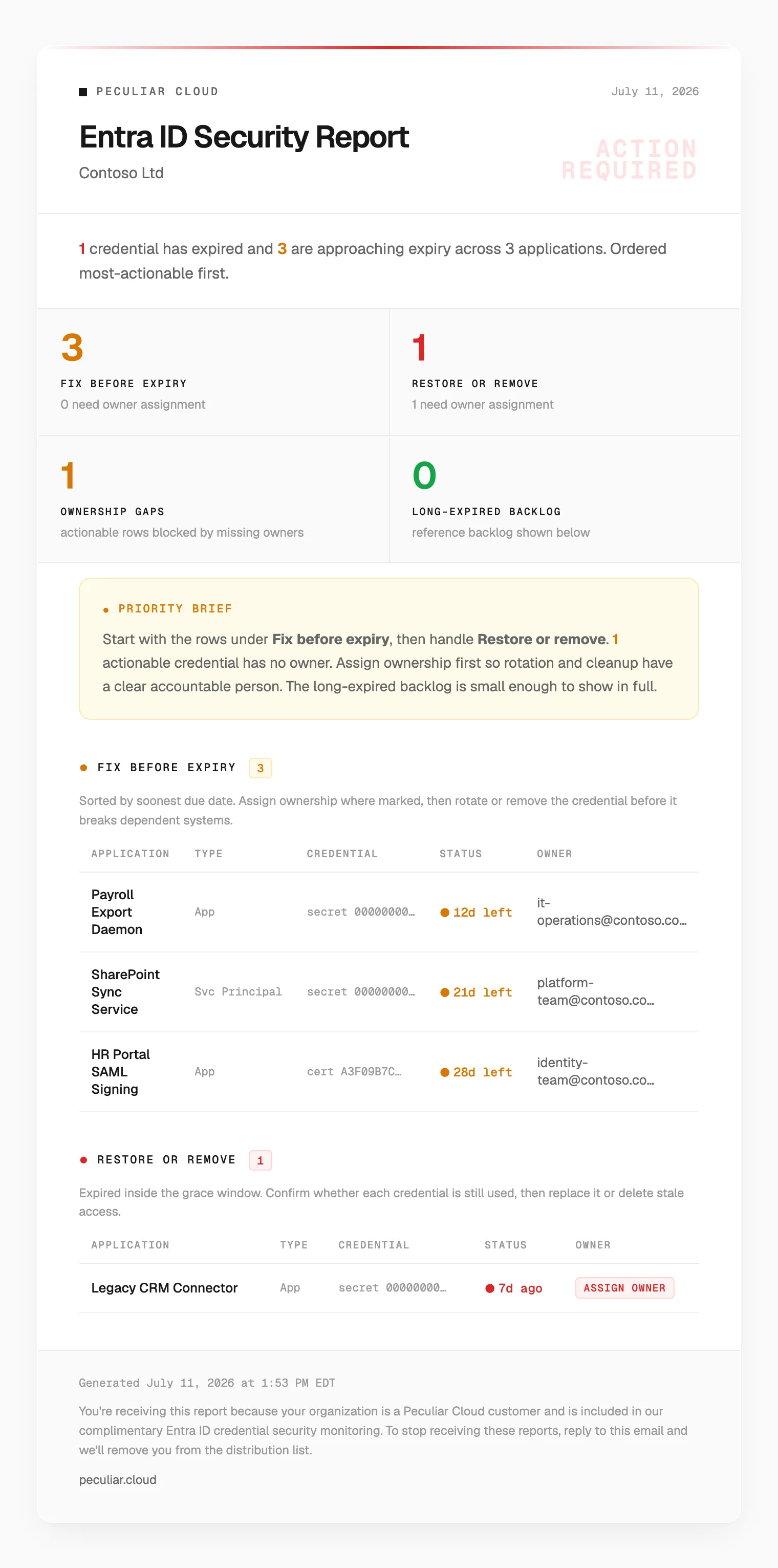
Rendered by the product’s real email renderer with invented Contoso data — client reports carry their own tenants’ credentials.
How it works
Zero standing infrastructure: for a few minutes a month it exists, then it doesn’t.
There is no server to patch and no dashboard to forget: the CI scheduler is the cron, each tenant runs in its own short-lived job (so one broken tenant cannot hide another’s report), and secrets are resolved at runtime from a vault — the only stored credential is a single service-account token. The engineering theme throughout is fail loud, never fake a green: malformed Graph records are counted and reported rather than silently dropped, an unparseable expiry date is treated as critical rather than filtered out, and a bad configuration aborts the run instead of quietly narrowing the scan.
Who watches the watchman
The monitor authenticates with a credential that also expires. It treats its own expiry as the most important one.
Decisions worth noting
- Read-only by construction. Three Graph permissions, none of them write. The blast radius of the monitor itself is zero — the least-privilege posture we ask of every automation.
- Fail loud, never fake a green. The dangerous failure mode of any monitor is a false all-clear. Every path that could silently shrink the scan — schema mismatches, unparseable dates, paging failures, bad config — either surfaces in the report or aborts the run visibly.
- A failed email cannot email about itself. The failure path is explicitly barred from using the channel that just failed — that alert goes to the job summary and the dead-man timer instead.
- The report is engineered, not templated. The HTML email stays under Gmail’s clipping threshold — enforced by a size-budget test — and renders in Outlook, which strips most styling. Deliverability is a correctness property.
- Classified failures with operator guidance. Nine failure kinds, each carrying a recommended action — the person on call should never have to reverse engineer what went wrong.
Built with
- TypeScript
- Microsoft Graph